
Script: Export single STEP from multiple STEP assets
- Type
 typescript
- Author
- bitbybit
- Date Created
- Nov 22, 2024, 11:22:41 AM
- Last Edit Date
- Jun 18, 2026, 7:26:42 PM
Project Information
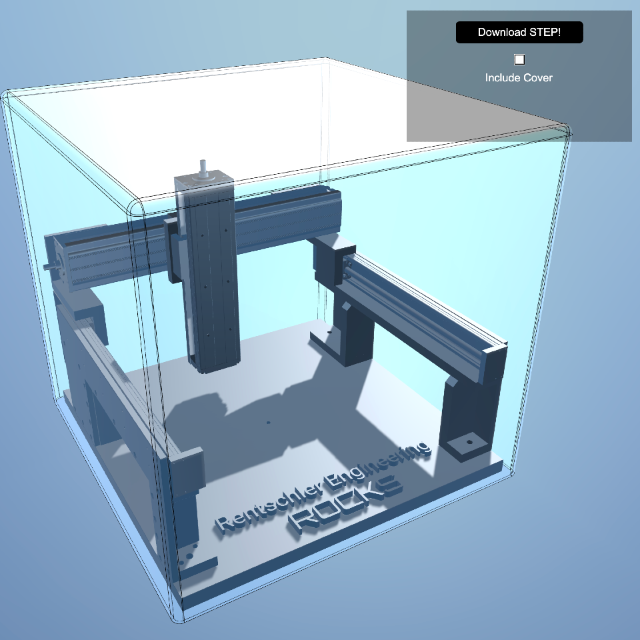
This project demonstrates how to load few static STEP files, combine them into a single compound shape with parametric geometry and export as a single STEP file
Script Code
let compoundShapeWithCover;
let compoundShapeWithoutCover;
let isCoverVisible = true;
let coverMesh: BABYLON.Mesh;

const shapesToCleanUp = [];

const start = async () => {
    // This could also exist on Shopify's CDN
    const url = "https://bitbybit.dev/files/users%2FyVqNAFXmieX0iAkdP6wAz5BJ4X82%2Fprojects%2Fh3XNAbbSL5n6mYgPaGmk%2Fassets%2Fmultiaxis-xyz.step?alt=media&token=43232172-fef4-4eca-a31d-787f295761c7";
    const stepFile = await bitbybit.asset.fetchFile({ url });
    const parsedStep = await bitbybit.occt.io.loadSTEPorIGES({
        assetFile: stepFile,
        adjustZtoY: true,
    });

    const scaledShape = await bitbybit.occt.transforms.scale({
        shape: parsedStep,
        factor: 0.01
    });

    const textOptions = new Bit.Advanced.Text3D.Text3DDto();
    textOptions.text = "Rentschler Engineering";
    textOptions.fontSize = 0.4;
    textOptions.height = 0.1;
    textOptions.origin = [0, 0.25, -2];
    const textShape = await bitbybit.advanced.text3d.create(textOptions);
    shapesToCleanUp.push(textShape.compound);

    const textOptions2 = new Bit.Advanced.Text3D.Text3DDto();
    textOptions2.text = "ROCKS";
    textOptions2.fontSize = 0.5;
    textOptions2.height = 0.12;
    textOptions2.origin = [0, 0.25, -2.6];
    textOptions2.fontType = Bit.Advanced.Text3D.fontsEnum.Orbitron;
    const textShape2 = await bitbybit.advanced.text3d.create(textOptions2);
    shapesToCleanUp.push(textShape2.compound);

    const cover = await createCover();
    shapesToCleanUp.push(cover);

    // Here all shapes are connected into a single compound shape that is also used during save
    const compound = await bitbybit.occt.shapes.compound.makeCompound({
        shapes: [scaledShape, textShape.compound, textShape2.compound]
    });

    compoundShapeWithCover = await bitbybit.occt.shapes.compound.makeCompound({
        shapes: [compound, cover]
    });
    compoundShapeWithoutCover = compound;

    const drawOptions = new Bit.Inputs.Draw.DrawOcctShapeOptions();
    drawOptions.precision = 0.2;
    drawOptions.drawEdges = false;
    drawOptions.edgeWidth = 0.5;
    drawOptions.faceColour = "#333333";
    bitbybit.draw.drawAnyAsync({ entity: compound, options: drawOptions });

    // cover drawn separately as it looks different
    const drawOptions2 = new Bit.Inputs.Draw.DrawOcctShapeOptions();
    drawOptions2.precision = 0.01;
    drawOptions2.drawEdges = true;
    drawOptions2.faceOpacity = 0.5;
    drawOptions2.edgeWidth = 0.5;
    drawOptions2.faceColour = "#333333";
    drawOptions2.edgeColour = "#000000";
    coverMesh = await bitbybit.draw.drawAnyAsync({ entity: cover, options: drawOptions2 });

    await bitbybit.occt.deleteShapes({ shapes: shapesToCleanUp });
}

async function createCover() {
    const coverHeight = 6;
    const cover = await bitbybit.occt.shapes.wire.createSquareWire({
        size: 6.3,
        center: [0, coverHeight, 0],
        direction: [0, 1, 0]
    });
    shapesToCleanUp.push(cover);
    const fillet = await bitbybit.occt.fillets.fillet2d({
        shape: cover,
        radius: 0.1,
    });
    shapesToCleanUp.push(fillet);
    const faceTop = await bitbybit.occt.shapes.face.createFaceFromWire({
        shape: fillet,
        planar: true,
    });
    shapesToCleanUp.push(faceTop);
    const extrudeSquare = await bitbybit.occt.operations.extrude({
        shape: fillet,
        direction: [0, -coverHeight, 0],
    });
    shapesToCleanUp.push(extrudeSquare);
    const sewedCover = await bitbybit.occt.shapes.shell.sewFaces({
        shapes: [faceTop, extrudeSquare],
        tolerance: 1e-7
    });
    shapesToCleanUp.push(sewedCover);
    const filletCover = await bitbybit.occt.fillets.filletEdges({
        shape: sewedCover,
        radius: 0.1,
    });
    shapesToCleanUp.push(filletCover);
    const thickSolid = await bitbybit.occt.operations.makeThickSolidSimple({
        shape: filletCover,
        offset: 0.04,
    });
    return thickSolid;
}

function createEnvironent() {
    const skyboxOptions = new Bit.Inputs.BabylonScene.SkyboxDto();
    skyboxOptions.blur = 0.3;
    bitbybit.babylon.scene.enableSkybox(skyboxOptions);
    const dirLightOptions = new Bit.Inputs.BabylonScene.DirectionalLightDto();
    dirLightOptions.intensity = 3;
    bitbybit.babylon.scene.drawDirectionalLight(dirLightOptions);
}

async function downloadSTEPFile() {
    let shapeToDownload;
    if (isCoverVisible) {
        shapeToDownload = compoundShapeWithCover;
    } else {
        shapeToDownload = compoundShapeWithoutCover;
    }
    await bitbybit.occt.io.saveShapeSTEP({
        shape: shapeToDownload,
        fileName: "model.step",
        adjustYtoZ: true,
        tryDownload: true,
    });
}

function createGUI() {
    const dashboard = BABYLON.GUI.AdvancedDynamicTexture.CreateFullscreenUI("UI");

    var panel = new BABYLON.GUI.StackPanel();
    panel.width = "700px";
    panel.height = "400px";
    panel.background = "#00000055";
    panel.paddingLeftInPixels = 40;
    panel.paddingTopInPixels = 40;
    panel.paddingRightInPixels = 40;
    panel.horizontalAlignment = BABYLON.GUI.Control.HORIZONTAL_ALIGNMENT_RIGHT;
    panel.verticalAlignment = BABYLON.GUI.Control.VERTICAL_ALIGNMENT_TOP;
    dashboard.addControl(panel);

    var button1 = BABYLON.GUI.Button.CreateSimpleButton("ButtonDownload", "Download STEP!");
    button1.width = "350px"
    button1.thickness = 0;
    button1.height = "120px";
    button1.paddingTop = 30;
    button1.paddingBottom = 30;
    button1.color = "white";
    button1.fontSize = 30;
    button1.cornerRadius = 10;
    button1.background = "black";
    button1.onPointerUpObservable.add(() => {
        downloadSTEPFile();
    });
    panel.addControl(button1);

    var checkboxCover = new BABYLON.GUI.Checkbox("Cover");
    checkboxCover.color = "white";
    checkboxCover.fontSize = 30;
    checkboxCover.isChecked = isCoverVisible;
    checkboxCover.width = "30px";
    checkboxCover.height = "30px";
    checkboxCover.onIsCheckedChangedObservable.add((value) => {
        isCoverVisible = value;
        coverMesh.getChildMeshes().forEach(m => {
            m.isVisible = value;
        });
    });
    panel.addControl(checkboxCover);

    var textBlock = new BABYLON.GUI.TextBlock("Cover", "Include Cover");
    textBlock.color = "white";
    textBlock.height = "50px";
    textBlock.paddingTop = 20;
    textBlock.fontSize = 30;
    panel.addControl(textBlock);

}

createGUI();
createEnvironent();
start();
Plans & Pricing
Choose Your Plan
Editor plans for 3D development, API keys for server-side CAD algorithms
Editor Plans
Cloud storage, private projects & 3D tools for Bitbybit editors
FREE
€0/forever- 100 cloud projects
- 10 private projects
- 1 GB cloud storage
- 25 MB per file
- 10 files per project
- 10 scripts per project
- Free 3D models
Get Started
SILVER
€12/month- Unlimited* private projects
- 25 GB cloud storage
- 100 MB per file
- 100 files per project
- 200 scripts per project
- Silver community and 3D models
- STEP → GLTF converter
- 3D Inspector (GLTF / GLB / STL)
Choose Silver
Most Popular
GOLD
€34/month- The Designer: parametric CAD by clicking
- Unlimited* private projects
- 100 GB cloud storage
- 250 MB per file
- 500 files per project
- Unlimited* scripts per project
- Silver and Gold community and 3D models
- STEP → GLTF converter
- 3D Inspector (GLTF / GLB / STL)
- Priority support
Choose Gold
* "Unlimited" means high limits that most users won't reach. Compare the plans
API Key Plans
Run CAD algorithms on managed cloud servers from your own backend applications
B2B
ENTERPRISE
Custom pricingCustom software development, dedicated servers & CAD automation at scale.
CAD Automation & Software
- Custom software development
- Cloud CAD automation pipelines
- 3D configurators (STEP & GLTF)
- Batch export jobs
- Custom algorithms & deployment
Infrastructure & Support
- Custom compute allocation
- Dedicated / VPS server tenants
- Long-running computation jobs
- Custom upload limits & overage
- SLA & premium support