
Script: Cloud Assets
- Type
 typescript
- Project
- Getting Started Demos TypeScript
- Author
- matas
- Date Created
- Jan 27, 2024, 7:15:57 AM
- Last Edit Date
- Jan 27, 2024, 9:57:34 AM
Project Information
This project contains demo scripts for TypeScript Monaco editor that are used as examples in the "Getting Started" section of the documentation.
Script Code
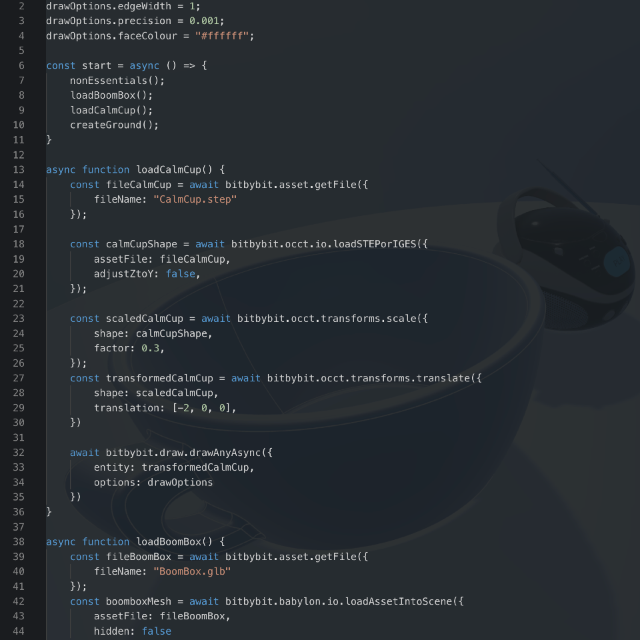
const drawOptions = new Bit.Inputs.Draw.DrawOcctShapeSimpleOptions();
drawOptions.edgeWidth = 1;
drawOptions.precision = 0.001;
drawOptions.faceColour = "#ffffff";

const start = async () => {
    nonEssentials();
    loadBoomBox();
    loadCalmCup();
    createGround();
}

async function loadCalmCup() {
    const fileCalmCup = await bitbybit.asset.getFile({
        fileName: "CalmCup.step"
    });

    const calmCupShape = await bitbybit.occt.io.loadSTEPorIGES({
        assetFile: fileCalmCup,
        adjustZtoY: false,
    });

    const scaledCalmCup = await bitbybit.occt.transforms.scale({
        shape: calmCupShape,
        factor: 0.3,
    });

    const transformedCalmCup = await bitbybit.occt.transforms.translate({
        shape: scaledCalmCup,
        translation: [-2, 0, 0],
    });

    await bitbybit.draw.drawAnyAsync({
        entity: transformedCalmCup,
        options: drawOptions
    });

    // It is a good practice to keep the memory of OCCT clean after you have constructed your drawn mesh.
    // Unless, of course, you will need some of these shapes in the future.
    bitbybit.occt.deleteShapes({
        shapes: [
            calmCupShape,
            scaledCalmCup,
            transformedCalmCup
        ]
    })
}

async function loadBoomBox() {
    const fileBoomBox = await bitbybit.asset.getFile({
        fileName: "BoomBox.glb"
    });
    const boomboxMesh = await bitbybit.babylon.io.loadAssetIntoScene({
        assetFile: fileBoomBox,
        hidden: false
    });
    boomboxMesh.position.x = 2;
}

async function createGround() {
    const groundShape = await bitbybit.occt.shapes.face.createCircleFace({
        radius: 7,
        center: [0, 0, 0],
        direction: [0, 1, 0]
    });

    await bitbybit.draw.drawAnyAsync({
        entity: groundShape,
        options: drawOptions
    });

    bitbybit.occt.deleteShape({
        shape: groundShape
    })
}

function nonEssentials() {
    bitbybit.babylon.scene.useRightHandedSystem({
        use: true
    });
    const dirLightOptions = new Bit.Inputs.BabylonScene.DirectionalLightDto();
    dirLightOptions.direction = [-100, -100, 100];
    bitbybit.babylon.scene.drawDirectionalLight(dirLightOptions);
    const skyboxOptions = new Bit.Inputs.BabylonScene.SkyboxDto();
    skyboxOptions.skybox = Bit.Inputs.Base.skyboxEnum.clearSky;
    bitbybit.babylon.scene.enableSkybox(skyboxOptions);
}

start();
Plans & Pricing
Choose Your Plan
Editor plans for 3D development, API keys for server-side CAD algorithms
Editor Plans
Cloud storage, private projects & 3D tools for Bitbybit editors
FREE
€0/forever- 100 cloud projects
- 10 private projects
- 1 GB cloud storage
- 25 MB per file
- 10 files per project
- 10 scripts per project
- Free 3D models
Get Started
SILVER
€12/month- Unlimited* private projects
- 25 GB cloud storage
- 100 MB per file
- 100 files per project
- 200 scripts per project
- Silver community and 3D models
- STEP → GLTF converter
- 3D Inspector (GLTF / GLB / STL)
Choose Silver
Most Popular
GOLD
€34/month- The Designer: parametric CAD by clicking
- Unlimited* private projects
- 100 GB cloud storage
- 250 MB per file
- 500 files per project
- Unlimited* scripts per project
- Silver and Gold community and 3D models
- STEP → GLTF converter
- 3D Inspector (GLTF / GLB / STL)
- Priority support
Choose Gold
* "Unlimited" means high limits that most users won't reach. Compare the plans
API Key Plans
Run CAD algorithms on managed cloud servers from your own backend applications
B2B
ENTERPRISE
Custom pricingCustom software development, dedicated servers & CAD automation at scale.
CAD Automation & Software
- Custom software development
- Cloud CAD automation pipelines
- 3D configurators (STEP & GLTF)
- Batch export jobs
- Custom algorithms & deployment
Infrastructure & Support
- Custom compute allocation
- Dedicated / VPS server tenants
- Long-running computation jobs
- Custom upload limits & overage
- SLA & premium support